
Whether you check the news on your smartphone first thing in the morning or you’d rather read the phone book than attend to anything on such a tiny screen, there’s one thing you’ve got to keep in mind – potential readers are looking at your site on mobile even if you’re not. In the same way that your website needs to be accessible to many different browsers, making a mobile version of your website available is an essential component of web design in today’s wireless world. Don’t worry – even if you’ve never touched an iPad, you can design for a mobile device without changing the appearance of your existing website. And you don’t need a smartphone to see how it looks on different models of phones, either. But what makes a great mobile website? It’s not just your website, smaller. It’s purposefully designed for the small screen. It’s simple, with essential information prioritized, smaller graphics and large buttons for people with fingers less dexterous than a fleetly texting tween’s. It uses features that mobile phones can handle. Features for browsers such as Flash and mouse-hovering applications don’t show up on mobile sites, and can prevent your site from loading altogether. It takes advantage of the natural capabilities of mobile phones. Menus are vertical, not horizontal. If you have a phone number, you can click to call. It’s swipe-able (also called ‘drag-screen’ by some) and doesn’t require the mobile viewer to ‘pinch and squint’ all over the page. Making websites…


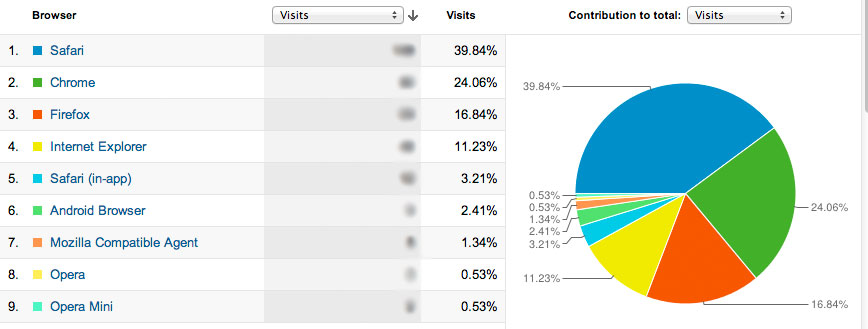
Analytics for Authors blogs have been edited to reflect the 01/16/2013 Google Analytics update. — Analytics for Authors introduced you to the Audience Overview dashboard in our last post – but before we dive into more sections of Google Analytics and learn how to compare data sets, what’s some helpful information we can gain from the Audience section? Your Visitors’ Browser Data on Google Analytics… [Read More]
Filed Under: Adobe Browser Lab, Browser compatibility, BrowserShots, Firefox, GoMo, google analytics for authors, Google Chrome, Internet Explorer, mobile, Safari
No Comments


Analytics for Authors blogs have been edited to reflect the 01/16/2013 Google Analytics update. — Google Analytics is a free service powered by Google that allows you to see “how visitors use your site, how they arrived on your site, and how you can keep them coming back.” Once you sign up for GA and install a short snippet of code into your website, you… [Read More]

You may have been noticing a particular status update making the rounds on Facebook. It’s a disclaimer that asserts the poster’s copyright and privacy rights, and it makes it seem like it’s as easy as copy/paste to protect yourself from anything you failed to catch in the Terms and Conditions you agreed to upon signing up for Facebook. Of course, it’s total malarky. Before you can… [Read More]
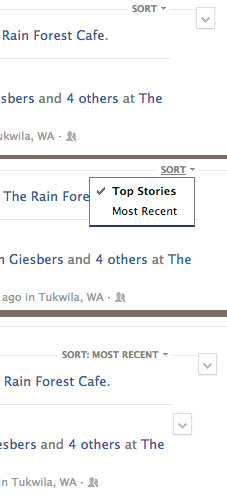
It was only up for a few hours – a programmer stumbled upon a link to access the raw, unfiltered chronological newsfeed that so many users want. But as soon as the internet had discovered a glimpse of the pure stream of friend posts and status updates, it was gone. You may have noticed that your news feed doesn’t give your all your friends’ posts. In fact,… [Read More]

When you first sign in to Facebook, your newsfeed automatically defaults to Top Stories – but how do these items get ranked? What makes your aunt’s status update rank higher than your soccer coach’s new car photos? And more importantly, how can you find yourself consistently ranked in the top stories? First off, take a deep breath, because you can’t control everything – if one… [Read More]